Showing posts with label BlackBerry. Show all posts

How to Reset BlackBerry without Removing Battery

Reset BlackBerry routinely required to free up RAM memory that sometimes unnoticed used by BlackBerry applications that are not closed properly. The most common way is unplug battery. But in addition, that way is not effective, sometimes also caused other problems. For example, clock indicator becomes inaccurate, because automatic updates do not work perfectly.

QuickPull
An alternative way most commonly is done by holding down Alt + Shift (right) + Del simultaneously for a while. Unfortunately, this way is not apply in all types of BlackBerry. For certain types, especially those not equipped with a QWERTY keyboard such as the twin Monza (9860) and Monaco (9850), no shortcut keys that can be pressed to reset.
The solution to reset BlackBerry without Unplug Battery, you can install third-party applications, one of them is QuickPull. Even, using this application you can schedule your BlackBerry to reset automatically.

Read more »

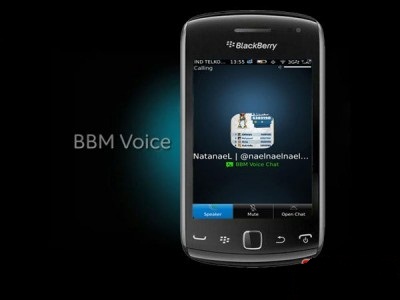
BBM Voice, Free Call via Wifi

As reported, there is interesting feature brought updates on Blackberry Messenger version 7. BBM feature called BBM Voice allows users to make voice calls like a cell phone between BlackBerry Messenger users.


To use this BBM feature, of course you must have the latest version of BBM (v.7).

You can update your BBM installed on your BlackBerry for free to the latest version. Condition, BlackBerry devices used must be equipped with BlackBerry OS version 6 or later.


BlackBerry OS version used can be checked on the option Options> Device> About Device Version.

1. When first used, you will be asked to enter your BlackBerry ID, which will also be become a means for backup-restore, and will allow you to move the data associated with the BBM (profile, contacts, groups and so on)


2. BBM Voice use wifi to connect. So make sure you are connected to wifi to use this feature.


3. You can start using BBM Voice by selecting the contact you want to dial. BBM Voice has visual indicators that show whether you have been using BBM contacts 7, or not.

If you do not see BBM Voice icon in the upper right corner of the screen means your BlackBerry contact do not use BBM 7. If the displayed icon is gray, means you use BBM contact 7 but can not be contacted because it is not connected to a wifi network. And if BBM Voice icon is green means you use BBM contacts 7 and ready for the call.


4. Click the icon or press the BBM Voice call to dial.


5. While connected to the BBM Voice voice call, you can open chat by pressing the open chat in the right corner of the screen. Or press the virtual speakers to use the loudspeaker.


6. You can also perform multi-tasking functions, such as moving to another application by holding down the menu.

7. When receiving an incoming call, you can press contacts avatars to receive calls. Click Reply in BBM or press the End key to reject the call.

Read more »

Block SMS and Call on BlackBerry

Have you ever thought to block SMS or a call from unwanted person? Then you confused how to block sms and call on BlackBerry. If you are still confused and still want to block SMS or phone call from someone then Anyun Gadget suggest that you read our post this time.

Anyun Gadget want to inform you, BlackBerry smartphone users about a powerful application that you can use to limit incoming SMS and call on your BlackBerry smartphone device. Applications that named Phone Warrior is an application that has been tested and it is a filnalis mBillionth 2012 this year, the highest award in south asia. And you can use this application for free.

Phone Warrior screen shots | AppWorld

Following Phone Warrior application features:

  1. Applications that can study each SMS and incoming calls with working principles which is emphasized in frequent SMS and phone calls.
  2. Detecting SPAM (SMS and Call) with Smart.
  3. Supported with a forum that is always up to date via http://m.phonewarrior.mobi/forums.
  4. Supports auto update feature from setting and settings of the spam.
  5. You can administer and manage names or groups that will be block/blacklist easily.

You can get this app in BlackBerry Appworld.
Read more »

About BlackBerry Protect Application

Today BlackBerry SmartPhone becomes a second laptop to its owner, because sometimes the most important data is processed and stored in BlackBerry SmartPhone memory. Like are in laptops, now someone can process data, word or excel documents on BlackBerry device. Or someone wants to make a company's financial statements and then send the data using BlackBerry Messenger service.


But what would happen if one day we lost our SmartPhone because accidentally dropped or moving to another hand illegally. While company's important data are in our BlackBerry memory, can be sure you'll worry of data which is confidential would leak to the public.

But it will be resolved soon if you utilize a free application provided by RIM, that is BlackBerry Protect. BlackBerry Protect is a free application provided by RIM as BlackBerry maker. With this application you can make a backup, device lock or even tracking your BlackBerry smartphone in case you forget or lose your device. And you can save all of files and data in your SmartPhone device by doing a remote wipe. Or if you lose your device because accidentally drop,you can send notification messages to your BlackBerry device and asked someone who find your BlackBery to return it.
Read more »

Repair BlackBerry White Screen


Has your BlackBerry device become error, it only shows a white screen and LED light flashing red ? I'm sure some BlackBerry users ever experienced this. White Screen Of Death or Blackberry just display a white screen and blank screen, usually happen on Blackberry Bold.


Problems like this are often occurred, in addition to issues like this followed also with BlackBerry battery quickly drains aka dropped. When we using BlackBerry , it device suddenly became blank, just a white screen appears, and can be run again by opening the battery,but immediately after that the battery indicator dropped drastically. If you have something like this means your device has White Screen of Death trouble. To solve a problem like this, there are some solutions that can be tried.

The first solution solve blank BlackBerry, try OS reload process using Blackberry Desktop Manager, download the latest OS and then try to update your BlackBerry Bold or Curve using latest firmware or OS, because these problems can also caused by the OS which not perfect. Than using Blackberry Desktop Manager OS Reload process can also using program like BBSAK or BlackBerry Swiss Army Knife.

If with OS Reload your BlackBerry still blank, Blackberry white screen, there is the possibility BlackBerry hardware is broken. And mostly component was broken is LCD


Read more »

Speed Up BlackBerry Boot


Do you feel your BlackBerry device is very slow? When your BlackBerry startup, its takes a long time to turn on? Booting or loading on your BlackBerry smartphone can be slower it could be because you are too much use or install applications on your BlackBerry, Anyun Gadget recommend to make BlackBerry boot faster you should install the applications that really useful and important to be used according to your activity.


However, if you already reducing the applications which installed on your BlackBerry smartphone, your smartphone is still slow then you should practice some tricks and how to speed up Blackberry boot time below:

Remove Battery
This info need to consider, you should remove the battery from your BlackBerry phone every 2 to 3 days, after that you should leave on for 3 minutes. Why is that, it aims to remove remains of unused files due process of chatting or browsing.

Clear Log
This step is equally important. To clear log press ALT+G L G. Well, then log results will appear on the screen, press Blackberry logo. Then select or clear log clear log> press delete.

Cleaning Memory
To celaning memory on BlackBerry smartphone, select options menu, security options, cleaning memory after it press Blackberry logo and select clean now.

Host Routing Table
You should also do this every 2 to 3 days. The way is select menu options, advanced options, host routing table, and then press the blackberry logo button> select register now.

Diagnostic Test
In this way Blackberry will look connected well. Starting from the PIN and register email. It is very easy, you just select options, mobile network, then press the Blackberry logo, diagnostic test will start.
Read more »

How to Boot BlackBerry in Safe Mode

Sometimes when you will turn on BlackBerry or when you restart your Blackberry, suddenly Blackberry not load or your device just stack or if can loading, just a half after that Blackberry restart again not go into the menu.


When Blackberry is not loading or not go to the menu one of reason could be because there are applications that are corrupt or broken, so finally hinder the process of Blackberry loading, especially if this corrupted application is running when Blackberry booting.

The best way to solve problem like this is to go into Blackberry recovery mode or Safe Mode. By going into Safe Mode, it means that corrupted applications can't run automatically when BlackBerry turned on, which means it applications will not hinder the process of BlackBerry loading.

To go into BlackBerry Safe Mode is easy, that's unplug battery then plug in again. Now when the red LED gone, then press and hold the Escape key, if there is a warning, select OK to go into Safe Mode or Recovery Mode.

After logging into Safe Mode, you can find or analyze application that causes error, such as application which recently installed. I recommend you to do reinstall that application.
Read more »

How to Find Lost or Stolen BlackBerry

After i wrote about How to Find Lost or Stolen Android Phone, Now I try to explain same issue, but here for BlackBerry smartphone. If your smartphone lost or stolen, don't panic, you can track and find the location of your smartphone, of course before it you has been prepared a tool to find your smartphone. As we all know, in smartphone there are smart features, one of this is to track your phone location.

blackberry.com
BlackBerry feature that always makes people connected can be used to find and track location of your lost BlackBerry. Because, in BlackBerry there is a different identification with other phone, that is PIN. And every handset has a unique PIN and different.

To find lost or stolen BlackBerry device you can use Blackberry Protect Application. BlackBerry Protect is a free application from RIM that offer protection services such as: backup, lock devices, find phone location, Wipe phone and sending notifications. You can also choose to have your crucial data backed up automatically.

Download Blackberry Protect application at App World or in this link. After it, install this application on you device.

Then to find your BlackBerry location visit http://us.blackberry.com/apps-software/protect/, you must log-in to access you BlackBerry location. Then go into Device Find option, then View Current Location. You can find lost or stolen BlackBerry location via map. In addition, this application is also has an options to display a message, that is useful for displaying a message on your BlackBerry device (for example: ask people who found you BlackBerry, to return it to you).
Read more »

How to Use BlackBerry Messenger on PC/Laptop

For some people, chatting on BBM (BlackBerry Messenger) using keypad on BlackBerry smartphone may be a hassle. In fact, it's just a matter of habit. What if there are services that offer a more attractive, for example by using your computer keyboard? To try this method do the following steps:


First, you must have "SOTI Pocket Controller Pro" software that must be installed into your PC. This software is like a desktop manager, but features in this software are more complete.

If in BlackBerry Desktop Manager you are only given the option to synchronizing data, file manager and other standard services. In this SOTI Pocket Controller Pro you can fully access all functions are on BlackBerry. Starting from the phone, Email, SMS, browser, Facebook, Twitter, Yahoo Messenger until BlackBerry Messenger itself. Even, for users of WhatsApp application you can also chat with iPhone users and also Android smartphones users.

Next, you must install a similar application on your BlackBerry smartphones. This application is actually just a media for data synchronization only. This application is compatible with BlackBerry OS version 4.6 or newer.

Now, to operate it, do this following steps:

Download "SOTI Pocket Controller Pro" software at http://www.soti.net/PCPro/Default.aspx. But, before you can download it, must first fill form requested data. Download and install software to your PC.

Next, download and install "SOTI Pocket Controller Pro" application for your BlackBerry. Can through http://www.soti.net/PCProBB/Default.aspx or http://pro.soti.net from your BlackBerry browser, or download it from BlackBerry AppWorld http://appworld.blackberry.com/webstore/content/13746?lang=en.

After download and install it, next you just run this software on your computer. Connect your BlackBerry into PC using media connector which support with your BlackBerry.
Run software "SOTI Pocket Controller Pro" on PC then connect your device, select suitable connection media via USB or WiFi. Connection and synchronization process will run automatically.
Read more »

How to Copy/Transfer BlackBerry Contacts to Android

When you replace your phone with new phones, the most important thing is how to move contacts from your old phone. This would not be difficult if your new mobile phone operating system same as OS in old phone, for example, you replace your BlackBerry phone with a new BlackBerry phone, you just backup your all data in memory card or via BlackBerry Desktop Software. But, if you replace your BlackBerry with Android, it should be done synchronizing to transfer all contact from your old BlackBerry to Android Phone.


A simple way to transfer, move or copy BlackBerry contact to Android is by using Google Sync.

Google Sync
Google Sync is one of Google's application that allows everyone to synchronize their contacts, Google Apps mail, and calendars with mobile phone or smartphone. So, smartphone users with any OS can use Google Sync to allow transfer contact list. Such as transfer BlackBerry contact to Android smartphone for example, before do it make sure you fill these things in below:
  1. Install Google Sync on your BlackBerry. The first thing you need to transfer BlackBerry contact to Android smartphone is to install Google Sync on your BlackBerry and can be downloaded at http://m/google.com/sync
  2. After install Google Sync, synchronize your BlackBerry via Gmail account.
  3. Make sure that your Gmail account right and can load any data from your BlackBerry.
  4. After that, activate your Android smartphone and connect with your own Gmail account.
  5. After all the process completed, the existing contact list on your BlackBerry now available on your Android smartphone.


Read more »

How to Download YouTube Video on BlackBerry

For you Blackberry users, who want to know how to download YouTube videos directly on your Blackberry, and saved directly on your BlackBerry. Anyun Gadget give an easy way to download YouTube videos directly from your BlackBerry devices.


To download YouTube videos follow these steps:
  • First, please visit this link directly from your BlackBerry Browser, http://m.vuclip.com
  • Then please type a keyword or artist's name or a video about what you want to download.
  • This will bring up some of the videos according to your keywords.
  • After that, please select the video which you want to download.
  • After open, the video that you choose will be downloaded directly, please select "Hi" for high video quality. and "REG" for regular or normal quality video.
  • And, now YouTube video already on your BlackBerry phone.
Read more »

BlackBerry Signal Explanation and Repair Solutions

SOS or missing signal on BlackBerry, sometimes BlackBerry signal become GSM, or BlackBerry signal GPRS/EDGE/3G that was uppercase to lowercase gprs/edge/3g certainly very annoying, making BlackBerry slow and some BlackBerry services can not be used as Browsing, BlackBerry Messenger, and others. Anyun gadget add an article about BlackBerry Signal Sign and Repair Solutions, so you understand any signal sign that appears on your BlackBerry and know how to fix it.


The following are explanation of BlackBerry signal signs and solutions for improvement your BlackBerry:

SOS Signal sign on BlackBerry
SOS signal on BlackBerry indicating that your BlackBerry does not have signal or signal is lost, it can happen if you in a room that gets very little intake of signal. SOS Signal on your BlackBerry make you can not sending or receiving SMS, browsing, chat, and all BlackBerry services that require a signal.

Solution: If you in the room with minimal signal, of course, you should find a place that gets enough signal so SOS signal on your BlackBerry return to normal. But if you are in the room which get sufficient signal but your BlackBerry still gets SOS signal, try to do a soft reset or hard reset / reboot / restart your BlackBerry, if you still can not get signal do Diagnostics Test with Host Routing Table.

GSM Signal Sign

GSM signal sign on BlackBerry, make your BlackBerry can only be used for SMS and phone, no service data services that can be used such as chat, email, browsing, etc..

Solution: almost same as solution BlackBerry SOS signal sign, you can PING! to RIM server with Diagnostics Test.

Lowercase gprs/edge/3g BlackBerry Signal
Lowercase gprs/edge/3g signal sign means you have not do registration to subscribe BlackBerry data packet or BIS. It may also happen that was GPRS/EDGE/3G uppercase to lowercase gprs/edge/3g because errors in the data service on the network operator.

Solution: If you have not subscribed BIS package you can subscribe it, read first list and tariff information. If you are already subscribed to BlackBerry data service and signal service become lowercase gprs/edge/3g then you can try hook or doing your BlackBerry signal Diagnostics Test.

Uppercase GPRS/EDGE/3G BlackBerry Signal

BlackBerry GPRS/EDGE/3G signal with capital letters means your BlackBerry is in the BIS service data packet so you can use all browsing features, chat, email, etc. according to BIS package you take.

How to Get BlackBerry Signal

Here are step by step how to get normal signal from SOS/GSM/lowercase gprs/edge/3g signal, but before, you already subscribed BlackBerry data package of course.

- Go to Manage Connection (on homescreen point cusor to the top).

- Uncheck Mobile Network box and check again

- If signal is still not return to normal, PING RIM server with Host Routing Table.
Read more »

How to Upgrade to BlackBerry OS 7.1

BlackBerry OS 7.1 is a massive update which done by RIM to its previous version BlackBerry OS 7.0. Although the look is not much different from version 7.0, BlackBerry OS 7.1 offers several new features that are pretty good and must to try such as Mobile WiFi Hotspot feature, FM Radio, calls via WiFi, BlackBerry Tag and Auto suggest.


Mobile WiFi Hotspot feature allows BlackBerry device becomes a WiFi router access point so WiFi other devices such as iPod, iPhone and others can connect to the internet via the BlackBerry.
The call feature via WiFi (WiFi Calling) allows you to make calls to other BlackBerry users who have WiFi calling feature via WiFi networks.

Back to the topic. This article is designed to give you an idea how to upgrade BlackBerry devices from OS 7.0 to OS 7.1. BlackBerry devices that can be upgraded to OS 7.1 are :

  • BlackBerry Bold 9900 Dakota
  • BlackBerry Bold 9930 Montana
  • BlackBerry Torch 9810/9850/9860
  • BlackBerry Curve 9350 Sedona
  • BlackBerry Curve 9360 Apollo 
  • BlackBerry Curve 9370


UPDATE 1: Official version of OS 7.1.0.219 for Curve 9360 is available and can be downloaded from here (Bell Mobility).

UPDATE 2: Official version of BlackBerry OS 7.1.0.258 for Curve 9360 Apollo already available and can be downloaded from here (Mobilicity).

In this tutorial I use BlackBerry Curve 9360 Apollo as an example.

Here are the steps:

1. Download latest version of BlackBerry Desktop Software. At this article published, the latest version is v6.1.0 B38 and can be downloaded here.

2. Download and install BlackBerry OS 7.1 Device Software which according with your BlackBerry device.
If you use BlackBerry Bold 9900/9930, Torch 9850, or Curve 9350, do not forget for delete vendor.xml file in the folder C:\Program Files\Common Files\Research In Motion\Apploader
Please note that you can use BlackBerry OS from any carrier by deleting the vendor.xml file.

3. Run BlackBerry Desktop Software (BDS) program. Then connect your BlackBerry device to your PC/laptop via USB cable. After your device is detected, a notification window will appear informing that the update version is available and ready to be installed. Click the "Get updates" to install it software update.

4. Next you will be reminded that the update process may take up to one hour and during update process is in progress, DO NOT disconnect your BlackBerry from your PC / laptop. In addition, it is recommended to backup all data, settings and applications before performing the update process. Click 'Install updates' to begin the update process.

5. Please wait update process. Do not ever interrupt and disconnect during update process in progress.

6. After about 30 minutes or more, update process was completed. Now you can unplug BlackBerry from PC/laptop connector. I recommend do 'Eject' process because BlackBerry is read like a flash disk / hard disk storage.

Good luck and feel the new features on the BlackBerry 7.1 OS such as Mobile WiFi Hotspot, FM Radio and others.

Read more »

BlackBerry Armstrong Curve 9320 Specification and Price

BlackBerry Curve 9320 | TechRadar
* Size
Dimensions: 109 x 60 x 12.7 mm
Thickness: 0.5 inches
Weight: 103 grams

* Display
Size: 2.44 inches
Resolution: 320 x 240 pixels
Pixel density: 164 ppi

* Operating System & Hardware
OS: BlackBerry OS 7.1
Java: No
Processor: Single Core, 806 MHz processor
Graphics processor: -
System memory: 512 MB RAM

* Camera
Primary: 3.15 MP, 2048x1536 pixels
Secondary: No
Video Recording: Yes
Features: LED flash, Geo-tagging, image stabilization

* Mobile Data
2G Network: GSM 850/900/1800/1900
3G Network: HSDPA (7.2 Mbps) HSUPA (5.76 Mbps)

* Connectivity
Bluetooth: 2.1 with A2DP
USB: microUSB v2.0
HDMI: No
Wi-Fi: 802.11 b,g,n (2.4 GHz)
GPS: A-GPS support

* Storage
Internal: unspecified
External: microSD, up to 32 GB

* Price
US$ 226
Read more »

RIM Officially Release BlackBerry Curve 9320 Armstrong

Finally, RIM announced new BlackBerry Curve 9320 aka Armstrong, complete with cheap prices and new features. This announcement comes after this smartphone information leaked last month. Armstrong is a 3G version of BlackBerry Curve 9220 Davis that was recently launched.

BlackBerry Curve 9320 | TechRadar
As reported by TechRadar, Wednesday (May 9, 2012), this smartphone comes with a price of 139.99 pounds (about USD225) on PAYG site. Users also don't have to wait too long to get it. BlackBerry Curve 9320 Armstrong is set to be released on 14 May.

This phone is equipped with BBM special key, for those who want to be socially connected. This smartphone even comes with 3G support, WiFi and FM radio feature.

Curve 9320 also has a 2.44 inch screen that only offer QHD resolution. It is also equipped with 512MB internal memory that can be added with microSD cards. RIM claims BlackBerry Armstrong battery which has 1450mAh can last up to 18 days in standby time. In the BlackBerry Messenger service has been integrated with Facebook and Twitter.

To see full specification of BlackBerry Armstrong Curve 9320 click here
Read more »

Latest Update Twitter for BlackBerry 3.0.0.24

Did you have get a notification to update Twitter from your BlackBerry? The latest version 3.0.0.24 comes with some changes and improvements.

This latest version provides fixes on issues that prevented some users from launching applications, fix freezing issue experienced by some users when connected to the BlackBerry Messenger, the restriction of characters a user name when registering for a new account, reactivate the profile mapping locations to latitude / longitude and fixes bug loading continuously when the tweet is being accessed.

So, want to try this latest update? Go to the BlackBerry App World, or you can download via your PC by clicking this link
Read more »

Change BlackBerry display Like iPhone

Application development company HedoneDesign, trying to bring taste of iPhone on BlackBerry smartphones. With B7i application that they make, BlackBerry user interface be very similar to iPhone.

crackberry
B7i optimize BlackBerry OS operating system (BBOS) 6 and 7, so that the application icon and its features similar to icons on the iPhone. As well as with the theme.

Details of the iPhone display which taken by B7i is perfect. Location of the battery indicator located on the right above, but BBOS 6 and 7 put the battery indicator on the left top. Cell signal indicator is moved from upper right to upper left. While in the middle placed digital clock. It's really very similar to the iPhone display.

B7i can run on BlackBerry Bold types 9650 9700/80/88/90, 9900/30/81, 9350/60/70 and BlackBerry Curve with BBOS 6 and 7.

HedoneDesign set B7i price at USD6.99 and for you who is interested can download it from this link.

Below is example display of B7i


Read more »

RIM will Release BlackBerry Curve 9320 Armstrong

Research in Motion (RIM) will release BlackBerry Curve 9320 aka Armstrong. This device is a 3G version of BlackBerry Curve 9220 Davis that was recently launched. As quoted from The Verge, BlackBerry Armstrong also became a part of the entry level phone from RIM.

Leaked Picture Armstrong | The Verge
Although not yet officially released, BlackBerry Armstrong is also successor of BlackBerry Curve 3G. Different from BlackBerry Davis that only equipped with 2G networks, Armstrong already equipped 3G networks.

From the leaked photos of BlackBerry Armstrong, design of Armstrong has a stainless steel bezel. This model is similar to the existing bezel on the BlackBerry 8900 Javelin.

Features of BlackBerry Armstrong is almost similar to BlackBerry Davis, that is BlackBerry operating system 7.1, a special key BlackBerry Messenger, FM radio and 1450 mAh Lithium ion battery.
BlackBerry Armstrong is rumored to be released first in Orlando, Florida United States next week.

To see full specification of BlackBerry Armstrong Curve 9320 click here
Read more »

BlackBerry Davis Curve 9220 Specification and Price

BlackBerry Curve 9220 | BlackBerry
* Size
Dimensions: 109 x 60 x 12.7 mm
Thickness: 0.5 inches
Weight: 102 grams

* Display
Size: 2.44 inches
Resolution: 320 x 240 pixels
Pixel density: 164 ppi

* Operating System & Hardware
OS: BlackBerry OS 7.1
Java: No
Processor: Mbuh, Single Core, 800 Mhz Processor
Graphics processor: -
System memory: 512 MB RAM

* Camera
Primary: 2 MP, 1600x1200 pixels
Secondary: No
Video Recording: Yes
Features: Fixed focus with 5X digital zoom

* Mobile Data
2G Network: GSM 850/900/1800/1900

* Connectivity
Bluetooth: 2.1 with A2DP
USB: microUSB v2.0
HDMI: No
Wi-Fi: 802.11 b,g,n (2.4 GHz)
GPS: No

* Storage
Internal: unspecified
External: microSD, up to 32 GB

* Price
Rs. 10990 (India) / US$ 219
Read more »

9 Tips When BlackBerry Slow Down

Users do not understand that the BlackBerry also has limitations in terms of memory. Social networking, email, BBM, BBM Group and the non-stop online are able to make the BlackBerry has become slow.

This is marked by the frequent appear 'clock sign' or 'an hourglass' when we're using the application on the BlackBerry. So how can solve when your BlackBerry is being slow? Here are 9 tips:

1. Install only important applications
Most of applications or themes will be quite to drain the ability of memory. Check back for any applications that we commonly use and delete the application or theme that we think is rarely used.

2. Limit the BBM group
BBM Group is the largest contributor to 'junk' that makes the BlackBerry we become slow. Look for a BBM group is actually useful, our other friends still yet be reached through personal BBM, email, Twitter or the others.

3. End chat on BBM if conversation is completed
If you feel that a conversation with someone important, you can keep the conversation in the media card by setting the BBM - Options - Find and select Save Chat History then choose media card.
But do not let, conversation activities was over long ago anyway you leave. Use BBM wisely, for in one way closed the chat activity every conversation is completed.

4. Remove unnecessary emails.
It's also one of the contributors to slow, especially email with an attachment that is large enough. When you do delete it will usually appear On Mailbox & Handheld option (email on the BlackBerry and the Mailbox Server will be deleted) or On Handheld (just email on BlackBerry are deleted).

If you want to delete the email that it is still quite important, simply select On Handheld only. Original email will still be stored in the Mailbox (Yahoo, Google, or other email client).

5. Get used to do clear log by: press alt + LG + LG -> BlackBerry Menu -> Clear Log

6. If you are Browsing, clear the memory cache on the browser.
How: BlackBerry Menu -> Browser -> Options -> Cache Operations -> clear history

7. Diligent doing memory cleanup
How: BlackBerry Menu -> Options -> Security Options -> Memory Cleaning -> Change status to the ENABLE position -> BB Menu -> Clean Now.

8. Maximize the use of external memory. Storage of photos, songs, videos and more should be stored into external memory or media card.
How setting: BlackBerry Menu -> Options -> Memory -> Media Card Support Change status to be ON.

9. Tip of the most powerful when your BlackBerry is slow:
Soft Reset: Press the Alt key simultaneously - Caps / aA button (right side near the sym) - del button - complete (Specially for BlackBerry which uses keyboard)

Hard Reset: Usually the term is also known with unplug the battery. This action is performed to make sure that no more energy / power is left. Leave for a maximum of 1 minute and then reinsert the battery.
Read more »